Google Test,简称gtest,是Google出品的C++单元测试框架。基于该框架,我们可以编写和运行单元测试、集成测试和功能测试。本系列博文,重点讲解gtest的使用方法和实现原理。
0x01gtest相关资源
https://github.com/google/googletest
https://google.github.io/googletest
0x02 gtest下载
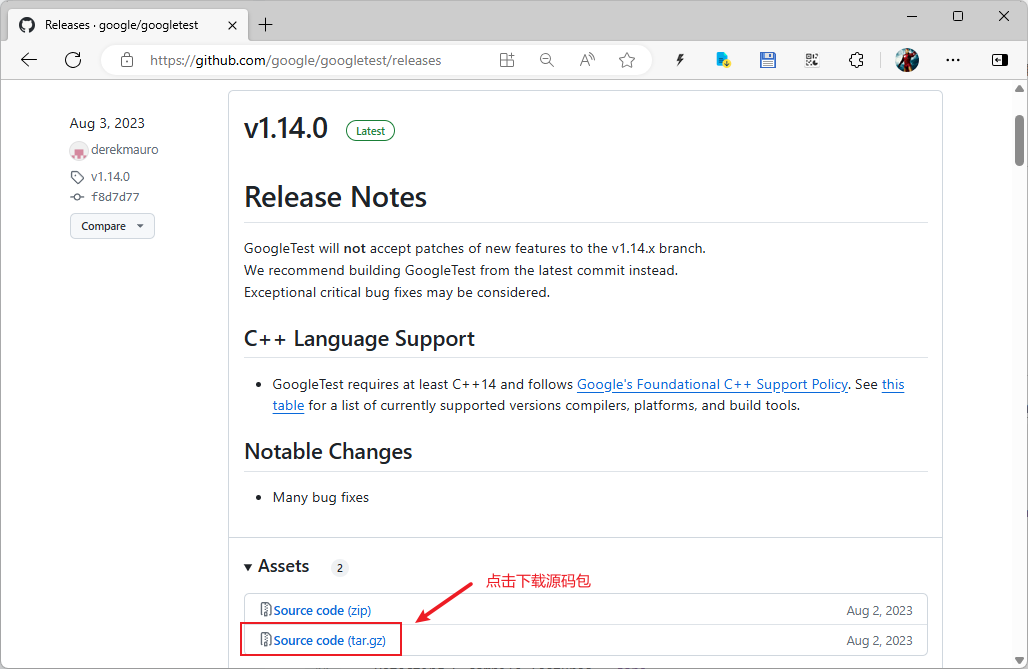
打开下载页面:
https://github.com/google/googletest/releases
。如下图所示,我们下载当前的最新版本v1.14.0,点击下载链接,完成后再将源码包googletest-1.14.0.tar.gz上传至服务器。
或者我们在服务器上。使用如下命令直接下载:
1
| wget https://github.com/google/googletest/archive/refs/tags/v1.14.0.tar.gz
|
0x03 gtest编译安装
gtest使用cmake编译,如果你的操作系统没有安装安装该软件,使用如下命令安装:
gtest默认安装在/usr/目录下,本文为了测试以及方便观察其所生成的有用文件,指定将其安装到/home/mancode/apps/gtest目录内。
gtest编译和安装使用如下命令:
1
2
3
4
5
6
| tar -zxvf googletest-1.14.0.tar.gz
cd googletest-1.14.0
mkdir build && cd build
cmake -DCMAKE_INSTALL_PREFIX=/home/mancode/apps/gtest ..
make
make install
|
如下所示,使用cmake生成makefile的过程输出:
 1
 2
 3
 4
 5
 6
 7
 8
 9
10
11
12
13
14
15
16
17
18
19
20
21
22
23
24
25
26
| mancode@manos:~/dev/gtest/googletest-1.14.0$
mancode@manos:~/dev/gtest/googletest-1.14.0$ mkdir build
mancode@manos:~/dev/gtest/googletest-1.14.0$ cd build
mancode@manos:~/dev/gtest/googletest-1.14.0/build$ cmake -DCMAKE_INSTALL_PREFIX=/home/mancode/apps/gtest ..
-- The C compiler identification is GNU 11.4.0
-- The CXX compiler identification is GNU 11.4.0
-- Detecting C compiler ABI info
-- Detecting C compiler ABI info - done
-- Check for working C compiler: /usr/bin/cc - skipped
-- Detecting C compile features
-- Detecting C compile features - done
-- Detecting CXX compiler ABI info
-- Detecting CXX compiler ABI info - done
-- Check for working CXX compiler: /usr/bin/c++ - skipped
-- Detecting CXX compile features
-- Detecting CXX compile features - done
-- Found Python3: /usr/bin/python3.10 (found version "3.10.12") found components: Interpreter
-- Looking for pthread.h
-- Looking for pthread.h - found
-- Performing Test CMAKE_HAVE_LIBC_PTHREAD
-- Performing Test CMAKE_HAVE_LIBC_PTHREAD - Success
-- Found Threads: TRUE
-- Configuring done
-- Generating done
-- Build files have been written to: /home/mancode/dev/gtest/googletest-1.14.0/build
mancode@manos:~/dev/gtest/googletest-1.14.0/build$
|
如下所示,使用make编译源代码的过程输出:
 1
 2
 3
 4
 5
 6
 7
 8
 9
10
11
12
13
14
15
| mancode@manos:~/dev/gtest/googletest-1.14.0/build$
mancode@manos:~/dev/gtest/googletest-1.14.0/build$ make
[ 12%] Building CXX object googletest/CMakeFiles/gtest.dir/src/gtest-all.cc.o
[ 25%] Linking CXX static library ../lib/libgtest.a
[ 25%] Built target gtest
[ 37%] Building CXX object googlemock/CMakeFiles/gmock.dir/src/gmock-all.cc.o
[ 50%] Linking CXX static library ../lib/libgmock.a
[ 50%] Built target gmock
[ 62%] Building CXX object googlemock/CMakeFiles/gmock_main.dir/src/gmock_main.cc.o
[ 75%] Linking CXX static library ../lib/libgmock_main.a
[ 75%] Built target gmock_main
[ 87%] Building CXX object googletest/CMakeFiles/gtest_main.dir/src/gtest_main.cc.o
[100%] Linking CXX static library ../lib/libgtest_main.a
[100%] Built target gtest_main
mancode@manos:~/dev/gtest/googletest-1.14.0/build$
|
如下所示,使用make install安装软件的过程输出:
 1
 2
 3
 4
 5
 6
 7
 8
 9
10
11
12
13
14
15
16
17
18
19
20
21
22
23
24
25
26
27
28
29
30
31
32
33
34
35
36
37
38
39
40
41
42
43
44
45
46
47
48
49
50
51
52
53
54
55
56
57
58
59
60
61
62
63
64
65
66
67
68
69
70
71
72
73
| mancode@manos:~/dev/gtest/googletest-1.14.0/build$
mancode@manos:~/dev/gtest/googletest-1.14.0/build$ make install
Consolidate compiler generated dependencies of target gtest
[ 25%] Built target gtest
Consolidate compiler generated dependencies of target gmock
[ 50%] Built target gmock
Consolidate compiler generated dependencies of target gmock_main
[ 75%] Built target gmock_main
Consolidate compiler generated dependencies of target gtest_main
[100%] Built target gtest_main
Install the project...
-- Install configuration: ""
-- Installing: /home/mancode/apps/gtest/include
-- Installing: /home/mancode/apps/gtest/include/gmock
-- Installing: /home/mancode/apps/gtest/include/gmock/gmock-function-mocker.h
-- Installing: /home/mancode/apps/gtest/include/gmock/gmock-matchers.h
-- Installing: /home/mancode/apps/gtest/include/gmock/gmock-more-matchers.h
-- Installing: /home/mancode/apps/gtest/include/gmock/gmock-nice-strict.h
-- Installing: /home/mancode/apps/gtest/include/gmock/gmock.h
-- Installing: /home/mancode/apps/gtest/include/gmock/internal
-- Installing: /home/mancode/apps/gtest/include/gmock/internal/custom
-- Installing: /home/mancode/apps/gtest/include/gmock/internal/custom/gmock-generated-actions.h
-- Installing: /home/mancode/apps/gtest/include/gmock/internal/custom/gmock-matchers.h
-- Installing: /home/mancode/apps/gtest/include/gmock/internal/custom/README.md
-- Installing: /home/mancode/apps/gtest/include/gmock/internal/custom/gmock-port.h
-- Installing: /home/mancode/apps/gtest/include/gmock/internal/gmock-pp.h
-- Installing: /home/mancode/apps/gtest/include/gmock/internal/gmock-internal-utils.h
-- Installing: /home/mancode/apps/gtest/include/gmock/internal/gmock-port.h
-- Installing: /home/mancode/apps/gtest/include/gmock/gmock-cardinalities.h
-- Installing: /home/mancode/apps/gtest/include/gmock/gmock-spec-builders.h
-- Installing: /home/mancode/apps/gtest/include/gmock/gmock-actions.h
-- Installing: /home/mancode/apps/gtest/include/gmock/gmock-more-actions.h
-- Installing: /home/mancode/apps/gtest/lib/libgmock.a
-- Installing: /home/mancode/apps/gtest/lib/libgmock_main.a
-- Installing: /home/mancode/apps/gtest/lib/pkgconfig/gmock.pc
-- Installing: /home/mancode/apps/gtest/lib/pkgconfig/gmock_main.pc
-- Installing: /home/mancode/apps/gtest/lib/cmake/GTest/GTestTargets.cmake
-- Installing: /home/mancode/apps/gtest/lib/cmake/GTest/GTestTargets-noconfig.cmake
-- Installing: /home/mancode/apps/gtest/lib/cmake/GTest/GTestConfigVersion.cmake
-- Installing: /home/mancode/apps/gtest/lib/cmake/GTest/GTestConfig.cmake
-- Up-to-date: /home/mancode/apps/gtest/include
-- Installing: /home/mancode/apps/gtest/include/gtest
-- Installing: /home/mancode/apps/gtest/include/gtest/gtest-test-part.h
-- Installing: /home/mancode/apps/gtest/include/gtest/gtest-spi.h
-- Installing: /home/mancode/apps/gtest/include/gtest/gtest_prod.h
-- Installing: /home/mancode/apps/gtest/include/gtest/gtest-matchers.h
-- Installing: /home/mancode/apps/gtest/include/gtest/gtest-param-test.h
-- Installing: /home/mancode/apps/gtest/include/gtest/gtest-assertion-result.h
-- Installing: /home/mancode/apps/gtest/include/gtest/gtest-printers.h
-- Installing: /home/mancode/apps/gtest/include/gtest/gtest_pred_impl.h
-- Installing: /home/mancode/apps/gtest/include/gtest/internal
-- Installing: /home/mancode/apps/gtest/include/gtest/internal/custom
-- Installing: /home/mancode/apps/gtest/include/gtest/internal/custom/README.md
-- Installing: /home/mancode/apps/gtest/include/gtest/internal/custom/gtest-port.h
-- Installing: /home/mancode/apps/gtest/include/gtest/internal/custom/gtest-printers.h
-- Installing: /home/mancode/apps/gtest/include/gtest/internal/custom/gtest.h
-- Installing: /home/mancode/apps/gtest/include/gtest/internal/gtest-internal.h
-- Installing: /home/mancode/apps/gtest/include/gtest/internal/gtest-type-util.h
-- Installing: /home/mancode/apps/gtest/include/gtest/internal/gtest-port-arch.h
-- Installing: /home/mancode/apps/gtest/include/gtest/internal/gtest-string.h
-- Installing: /home/mancode/apps/gtest/include/gtest/internal/gtest-death-test-internal.h
-- Installing: /home/mancode/apps/gtest/include/gtest/internal/gtest-port.h
-- Installing: /home/mancode/apps/gtest/include/gtest/internal/gtest-param-util.h
-- Installing: /home/mancode/apps/gtest/include/gtest/internal/gtest-filepath.h
-- Installing: /home/mancode/apps/gtest/include/gtest/gtest.h
-- Installing: /home/mancode/apps/gtest/include/gtest/gtest-typed-test.h
-- Installing: /home/mancode/apps/gtest/include/gtest/gtest-death-test.h
-- Installing: /home/mancode/apps/gtest/include/gtest/gtest-message.h
-- Installing: /home/mancode/apps/gtest/lib/libgtest.a
-- Installing: /home/mancode/apps/gtest/lib/libgtest_main.a
-- Installing: /home/mancode/apps/gtest/lib/pkgconfig/gtest.pc
-- Installing: /home/mancode/apps/gtest/lib/pkgconfig/gtest_main.pc
mancode@manos:~/dev/gtest/googletest-1.14.0/build$
|
如下所示,gtest最终安装的文件列表:
 1
 2
 3
 4
 5
 6
 7
 8
 9
10
11
12
13
14
15
16
17
18
19
20
21
22
23
24
25
26
27
28
29
30
31
32
33
34
35
36
37
38
39
40
41
42
43
44
45
46
47
48
49
50
51
52
53
54
55
56
57
58
59
60
61
62
63
64
65
66
67
68
69
70
71
| mancode@manos:~/apps/gtest$ pwd
/home/mancode/apps/gtest
mancode@manos:~/apps/gtest$
mancode@manos:~/apps/gtest$ tree .
.
├── include
│ ├── gmock
│ │ ├── gmock-actions.h
│ │ ├── gmock-cardinalities.h
│ │ ├── gmock-function-mocker.h
│ │ ├── gmock.h
│ │ ├── gmock-matchers.h
│ │ ├── gmock-more-actions.h
│ │ ├── gmock-more-matchers.h
│ │ ├── gmock-nice-strict.h
│ │ ├── gmock-spec-builders.h
│ │ └── internal
│ │ ├── custom
│ │ │ ├── gmock-generated-actions.h
│ │ │ ├── gmock-matchers.h
│ │ │ ├── gmock-port.h
│ │ │ └── README.md
│ │ ├── gmock-internal-utils.h
│ │ ├── gmock-port.h
│ │ └── gmock-pp.h
│ └── gtest
│ ├── gtest-assertion-result.h
│ ├── gtest-death-test.h
│ ├── gtest.h
│ ├── gtest-matchers.h
│ ├── gtest-message.h
│ ├── gtest-param-test.h
│ ├── gtest_pred_impl.h
│ ├── gtest-printers.h
│ ├── gtest_prod.h
│ ├── gtest-spi.h
│ ├── gtest-test-part.h
│ ├── gtest-typed-test.h
│ └── internal
│ ├── custom
│ │ ├── gtest.h
│ │ ├── gtest-port.h
│ │ ├── gtest-printers.h
│ │ └── README.md
│ ├── gtest-death-test-internal.h
│ ├── gtest-filepath.h
│ ├── gtest-internal.h
│ ├── gtest-param-util.h
│ ├── gtest-port-arch.h
│ ├── gtest-port.h
│ ├── gtest-string.h
│ └── gtest-type-util.h
└── lib
├── cmake
│ └── GTest
│ ├── GTestConfig.cmake
│ ├── GTestConfigVersion.cmake
│ ├── GTestTargets.cmake
│ └── GTestTargets-noconfig.cmake
├── libgmock.a
├── libgmock_main.a
├── libgtest.a
├── libgtest_main.a
└── pkgconfig
├── gmock_main.pc
├── gmock.pc
├── gtest_main.pc
└── gtest.pc
11 directories, 52 files
mancode@manos:~/apps/gtest$
|
0x04 gtest简单测试
上文我们已经成功编译gtest,接下来我们写个简单的例子来看下gtest是如何使用的。
首先,编写单元测试用例:
 1
 2
 3
 4
 5
 6
 7
 8
 9
10
11
12
13
14
15
16
17
18
19
20
21
22
23
24
25
26
| #include <iostream>
#include <string>
#include <gtest/gtest.h>
int add(int a, int b)
{
return a + b;
}
TEST(Fun, AddTest0) // 该用例为成功案例
{
EXPECT_EQ(2, add(1, 1));
EXPECT_EQ(4, add(2, 2));
}
TEST(Fun, AddTest1) // 该用例为失败案例
{
EXPECT_EQ(1, add(1, 1));
}
int main(int argc, char **argv)
{
::testing::InitGoogleTest(&argc, argv);
return RUN_ALL_TESTS();
}
|
然后,我们写个简单的Makefile或者你直接用g++进行编译。
 1
 2
 3
 4
 5
 6
 7
 8
 9
10
11
| GTEST_INC_PATH := /home/mancode/apps/gtest
GTEST_INC := -I${GTEST_INC_PATH}/include
GTEST_LIB_PATH := /home/mancode/apps/gtest/lib
GTEST_LIB := ${GTEST_LIB_PATH}/libgtest_main.a ${GTEST_LIB_PATH}/libgtest.a
test:
g++ -o test test.cc ${GTEST_INC} ${GTEST_LIB}
clean:
rm -rf test
|
或者我写好的
测试代码
以及
Makefile
,右键选择将链接另存为,保存到本地。
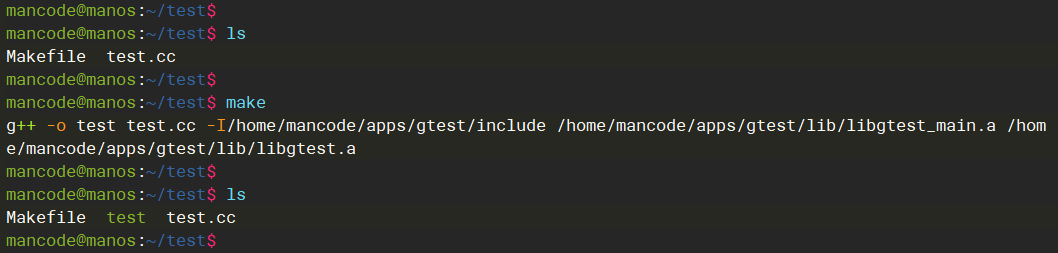
最后,我们在服务器上编译测试代码。
编译测试用例,如下图所示:
运行测试用例,如下图所示:

0x05 静态库说明
二者的区别其实比较简单,但要说清楚还得从gtest的源代码说起。
gtest源代码在 googletest-1.14.0/googletest/src 目录内。主要由这些文件组成:

是由gtest-all.cc,gtest.cc,gtest-filepath.cc,gtest-port.cc,gtest-test-part.cc,gtest-assertion-result.cc,gtest-death-test.cc, gtest-matchers.cc,gtest-printers.cc,gtest-typed-test.cc,编译而来。
是由gtest_main.cc,编译而来。
总结一下,如果在你的测试代码中:
- 自己实现main函数,那只需链接libgtest.a即可
- 没有实现main函数,那么你需要同时链接libgtest_main.a和libgtest.a这两个静态库。也就是说libgtest_main.a会帮你定义main入口函数。