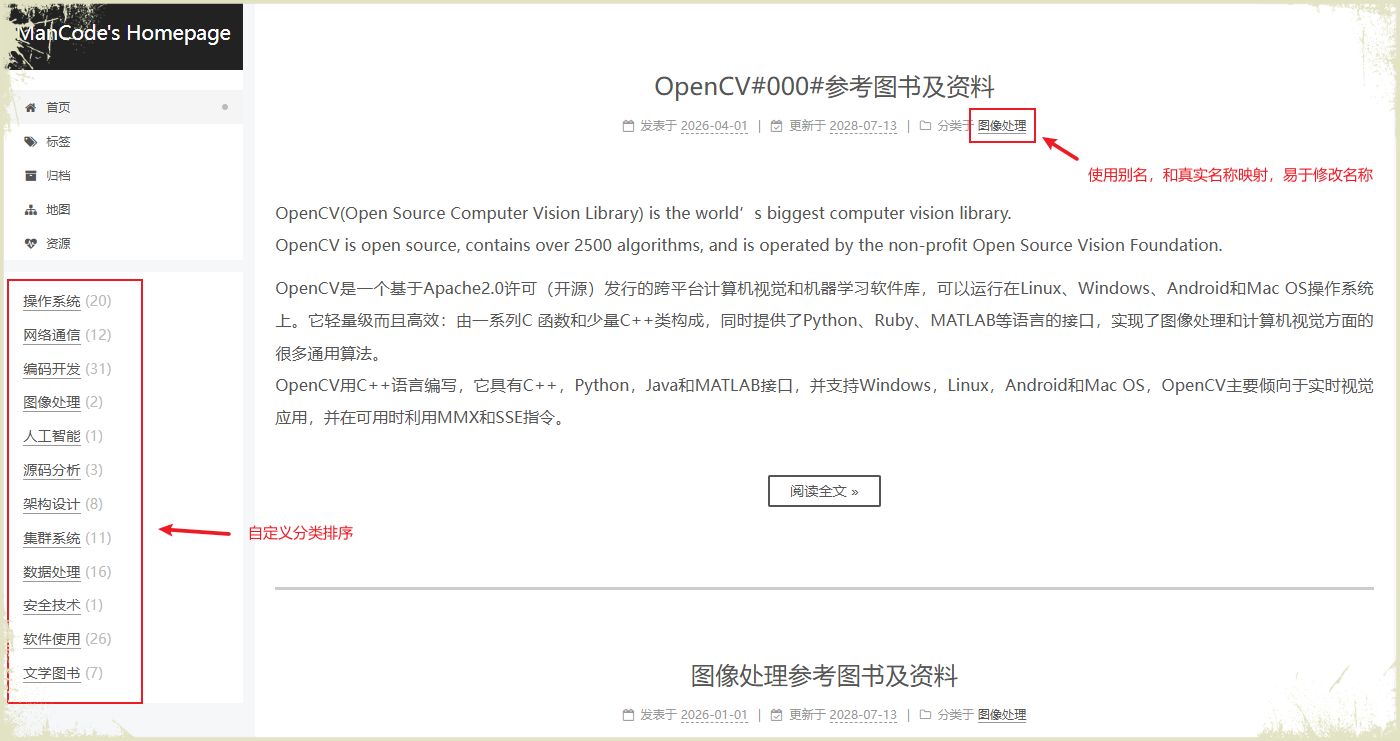
本次对Hexo的修改,主要完成如下两个功能:
- 第一,Hexo的分类默认使用名称按照字典排序,我希望是自己可以方便指定分类序号,从而按序号排序显示;
- 第二,Hexo的分类名称需要直接写在Post文档categories的字段,后续如果需要修改某个分类名称,需要修改多个文档,我希望是给每个分类起个别名,Post文档中使用该别名,在特定的文档中定义别名和真实名称的映射关系,然后Hexo生成静态页面时,Hexo自动对别名进行替换。
0x00 实现步骤
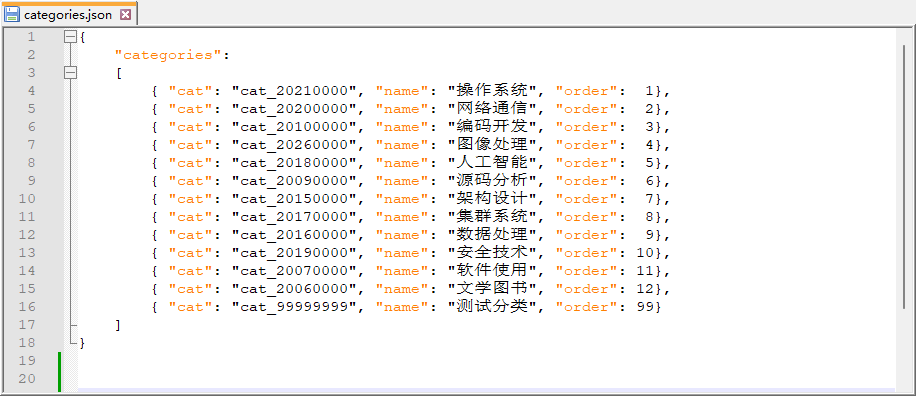
- 第一,在博客项目的根目录创建文件categories.json,文件中定义别名和真实名称的映射关系;
- 第二,自己创建创建一个模块,该模块中完成categories.json读取、别名到真实名称的转换以及分类排序等三个功能。并将该模块发布到npmjs.org;
- 第三,修改node_modules\hexo\dist\plugins\helper\list_categories.js中的listCategoriesHelper函数,使用我们上述自定义的分类函数,来生成静态文件。
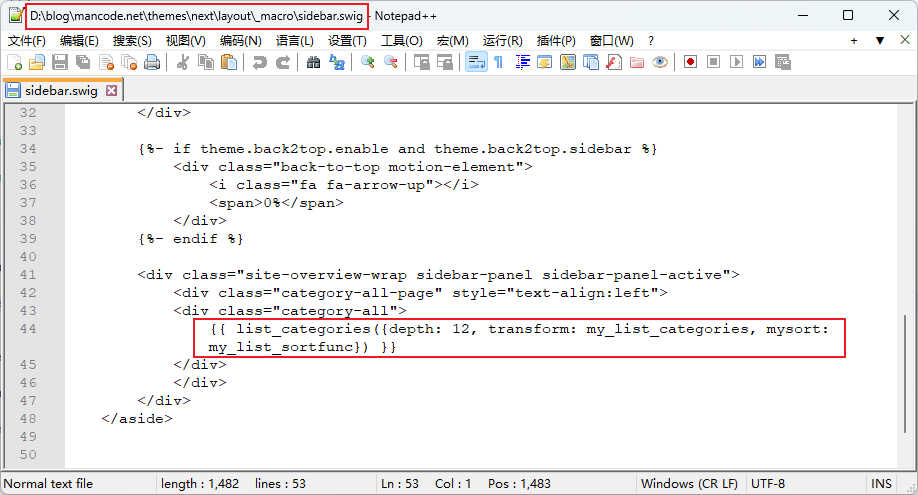
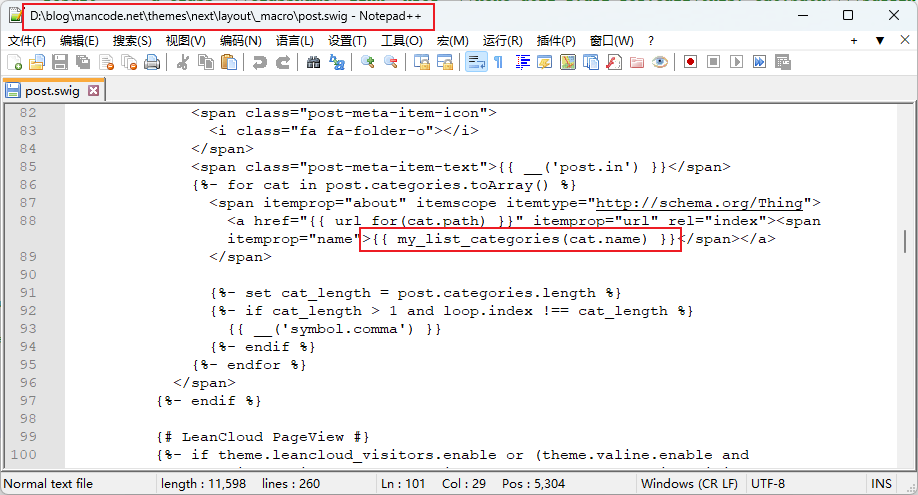
- 第四,修改themes\next\layout_macro\sidebar.swig 和 themes\next\layout_macro\post.swig,完成别名到真实名称的转换;
0x01 第一步:创建文件categories.json
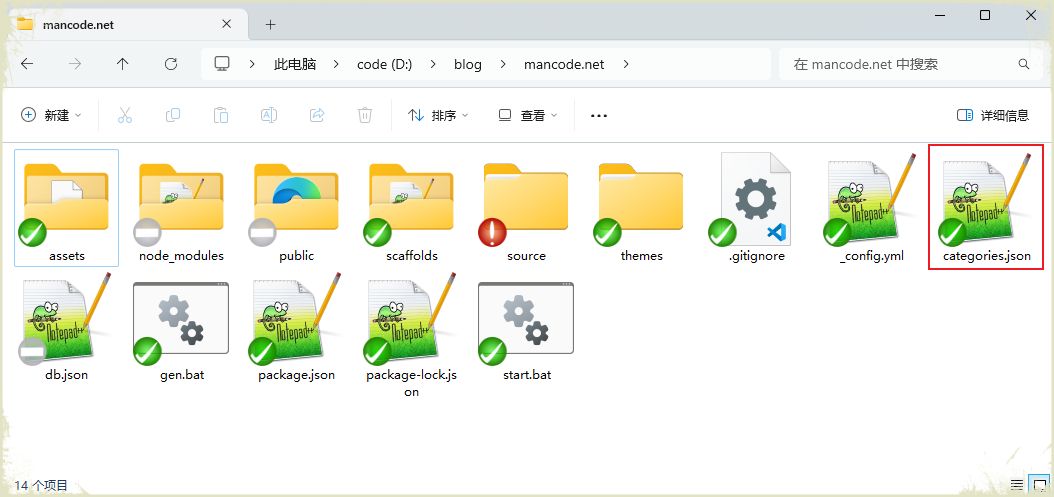
在项目根目录创建映射文件:
我们以当前博客网站的分类作为演示,其内容如下:
0x02 第二步:实现自己的函数,并定义为新的模块
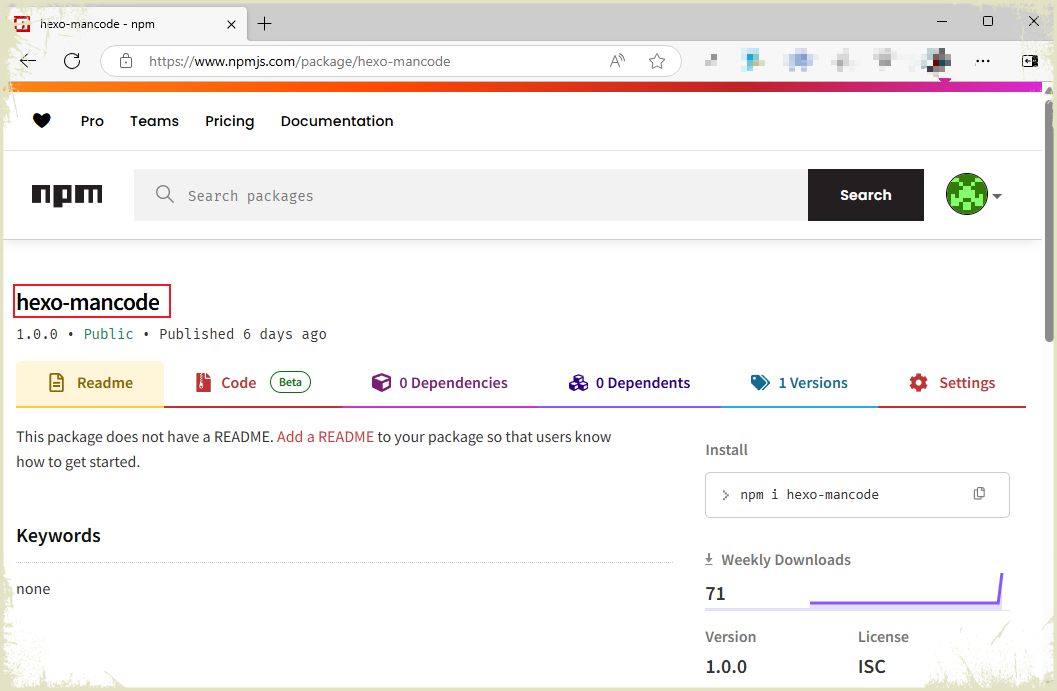
我给这个模块起了名字叫做 hexo-mancode,该模块的文件index.js内容如下:
 1
 2
 3
 4
 5
 6
 7
 8
 9
10
11
12
13
14
15
16
17
18
19
20
21
22
23
24
25
26
27
28
29
30
31
32
33
34
35
36
37
38
39
40
41
42
| fs = require('fs');
global.pages_mancode = {};
// 完成分类映射表的读取
hexo.extend.filter.register('before_generate', function(){
this.log.info("hexo_mancode: before_generate ****");
global.pages_mancode = JSON.parse(fs.readFileSync("./categories.json", "utf8"));
});
// 别名与真实名称的映射
hexo.extend.helper.register('my_list_categories', function(catname){
var item = global.pages_mancode.categories.find(item => { return item.cat == catname; } );
return (item == undefined)?"没有分类":item.name;
});
// 分类按指定的需要进行排序
hexo.extend.helper.register('my_list_sortfunc', function() {
return (av, bv) => {
var as = global.pages_mancode.categories.find(item => { return item.cat == av.name; } );
var bs = global.pages_mancode.categories.find(item => { return item.cat == bv.name; } );
if (as == undefined && bs == undefined)
{
return av.name < bv.name ?-1:(av.name > bv.name ?1:0);
}
else if (as != undefined && bs != undefined)
{
return as.order < bs.order?-1:(as.order > bs.order?1:0);
}
else if (as == undefined)
{
return 1;
}
else if (bs == undefined)
{
return -1;
}
}
});
|
文件创建完毕之后,将该模块发布到npmjs.org,发布模块的具体方法请参考当前博客的其他文章。
修改package.json文件,增加对hexo-mancode的依赖和自动下载。
 1
 2
 3
 4
 5
 6
 7
 8
 9
10
11
12
13
14
15
16
17
18
19
20
21
22
23
24
25
26
27
| {
"name": "hexo-site",
"version": "0.0.0",
"private": true,
"scripts": {
"build": "hexo generate",
"clean": "hexo clean",
"deploy": "hexo deploy",
"server": "hexo server"
},
"hexo": {
"version": "7.3.0"
},
"dependencies": {
"hexo": "^7.3.0",
"hexo-generator-archive": "^2.0.0",
"hexo-generator-category": "^2.0.0",
"hexo-generator-index": "^4.0.0",
"hexo-generator-tag": "^2.0.0",
"hexo-renderer-ejs": "^2.0.0",
"hexo-renderer-marked": "^6.3.0",
"hexo-renderer-stylus": "^3.0.1",
"hexo-server": "^3.0.0",
"hexo-theme-landscape": "^1.0.0",
"hexo-mancode": "^1.0.0"
}
}
|
0x03 第三步:修改模块hexo的list_categories.js函数
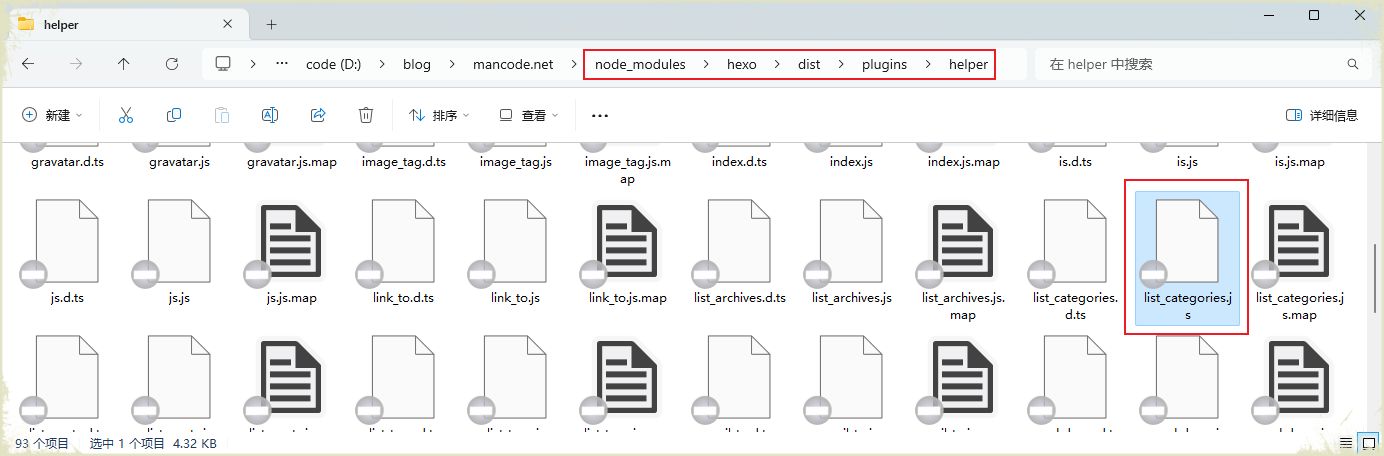
node_modules\hexo\dist\plugins\helper\list_categories.js文件的位置,如下图所示:
修改后的文件内容(
修改前的list_categories.js
,
修改后的list_categories.js
):
  1
  2
  3
  4
  5
  6
  7
  8
  9
 10
 11
 12
 13
 14
 15
 16
 17
 18
 19
 20
 21
 22
 23
 24
 25
 26
 27
 28
 29
 30
 31
 32
 33
 34
 35
 36
 37
 38
 39
 40
 41
 42
 43
 44
 45
 46
 47
 48
 49
 50
 51
 52
 53
 54
 55
 56
 57
 58
 59
 60
 61
 62
 63
 64
 65
 66
 67
 68
 69
 70
 71
 72
 73
 74
 75
 76
 77
 78
 79
 80
 81
 82
 83
 84
 85
 86
 87
 88
 89
 90
 91
 92
 93
 94
 95
 96
 97
 98
 99
100
101
102
103
104
105
106
107
108
109
110
| "use strict";
const hexo_util_1 = require("hexo-util");
function listCategoriesHelper(categories, options) {
if (!options && (!categories || !Object.prototype.hasOwnProperty.call(categories, 'length'))) {
options = categories;
categories = this.site.categories;
}
categories = categories;
if (!categories || !categories.length)
return '';
options = options || {};
const { style = 'list', transform, separator = ', ', suffix = '', mysort } = options;
const showCount = Object.prototype.hasOwnProperty.call(options, 'show_count') ? options.show_count : true;
const className = options.class || 'category';
const depth = options.depth ? parseInt(String(options.depth), 10) : 0;
const orderby = options.orderby || 'name';
const order = options.order || 1;
const showCurrent = options.show_current || false;
const childrenIndicator = Object.prototype.hasOwnProperty.call(options, 'children_indicator') ? options.children_indicator : false;
const prepareQuery = parent => {
const query = {};
if (parent) {
query.parent = parent;
}
else {
query.parent = { $exists: false };
}
return categories.find(query).sort(orderby, order);
};
// 增加的函数
const myhtml = () => {
let mhtml = "";
var sortBy = mysort?mysort():(a, b)=>{ return (a.name < b.name)?-1:(a.name>b.name?1:0); };
categories.data.sort(sortBy).forEach((cat) => {
mhtml += `<li class="${className}-list-item">`;
mhtml += `<a class="${className}-list-link" href="${hexo_util_1.url_for.call(this, cat.path)}${suffix}">`;
mhtml += transform ? transform(cat.name) : cat.name;
mhtml += '</a>';
mhtml += `<span class="${className}-list-count">${cat.length}</span>`;
mhtml += '</li>';
});
return mhtml;
}
const hierarchicalList = (level, parent) => {
let result = '';
prepareQuery(parent).forEach((cat) => {
let child;
if (!depth || level + 1 < depth) {
child = hierarchicalList(level + 1, cat._id);
}
let isCurrent = false;
if (showCurrent && this.page) {
for (let j = 0; j < cat.length; j++) {
const post = cat.posts.data[j];
if (post && post._id === this.page._id) {
isCurrent = true;
break;
}
}
// special case: category page
isCurrent = isCurrent || (this.page.base && this.page.base.startsWith(cat.path));
}
const additionalClassName = child && childrenIndicator ? ` ${childrenIndicator}` : '';
result += `<li class="${className}-list-item${additionalClassName}">`;
result += `<a class="${className}-list-link${isCurrent ? ' current' : ''}" href="${hexo_util_1.url_for.call(this, cat.path)}${suffix}">`;
result += transform ? transform(cat.name) : cat.name;
result += '</a>';
if (showCount) {
result += `<span class="${className}-list-count">${cat.length}</span>`;
}
if (child) {
result += `<ul class="${className}-list-child">${child}</ul>`;
}
result += '</li>';
});
return result;
};
const flatList = (level, parent) => {
let result = '';
prepareQuery(parent).forEach((cat, i) => {
if (i || level)
result += separator;
result += `<a class="${className}-link" href="${hexo_util_1.url_for.call(this, cat.path)}${suffix}">`;
result += transform ? transform(cat.name) : cat.name;
if (showCount) {
result += `<span class="${className}-count">${cat.length}</span>`;
}
result += '</a>';
if (!depth || level + 1 < depth) {
result += flatList(level + 1, cat._id);
}
});
return result;
};
if (style === 'list') {
//return `<ul class="${className}-list">${hierarchicalList(0)}</ul>`;
return `<ul class="${className}-list">${myhtml()}</ul>`;
}
return flatList(0);
}
module.exports = listCategoriesHelper;
|
themes\next\layout_macro\sidebar.swig文件修改如下:
themes\next\layout_macro\post.swig文件修改如下:
0x05 第五步:使用方法
第一:如果重新安装模块,也就是重建node_modules文件夹,需要在执行 npm install 之后,手动修改 list_categories.js 文件。
第二:如果新增加分类或者调整分类的排序,需要调整categories.json中内容。
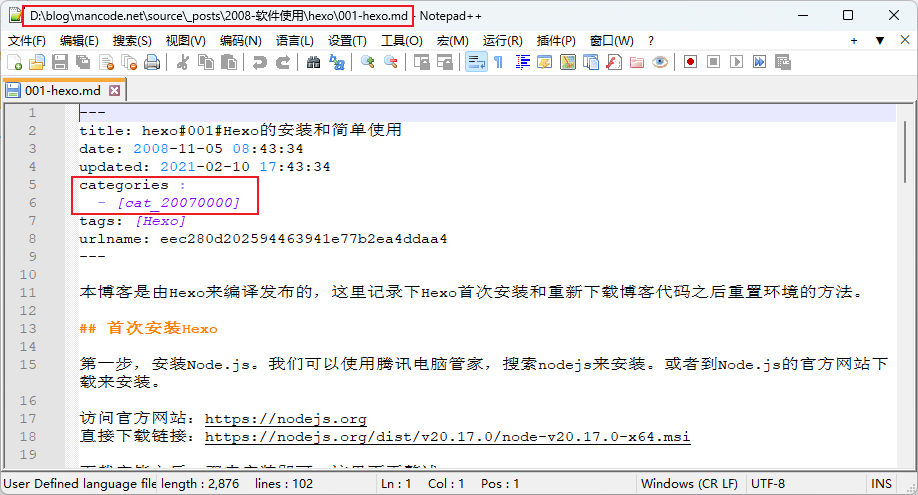
第三:post文档指定分类别名的方法,如下图所示:
0x06 参考资料